How do I set up the SPRO1?
The SPRO1 makes it possible to see your home in real time and to warn you when it detects movement. To start, it is first necessary to download the TecTecTec application available on Android and iOS. Open the application and create your account. Touch the “+” at the top left of the smartlink screen. Now follow the instructions. You will be asked for the WiFi key / box.
Please feel free to watch the following video:
Selecting play allows YouTube to receive device and viewing information and use cookies or similar storage. You can close the player at any time. YouTube privacy
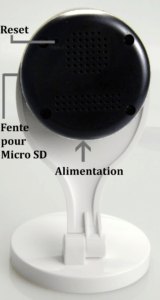
If you have trouble setting up the SPRO1, reset it to factory settings first. To do this, press the “Reset” button on the back of the camera (keep pushing until the camera says “Reset to default settings”)